Trading From the Chart: Stop and Target Orders That Rest at the Exchange
The order chart draws your entry, stop and target on the candles, each labelled with the dollars it would book, and dragging a line moves the order at your broker. The stop and target are a native OCO resting at the exchange, not a script in the app. We proved that live before we shipped it, including the failure that makes most platform stops look safer than they are.
The order chart is the part of the terminal where the chart stops being a picture and becomes the order book of your own position. Entry, stop and target are drawn as lines on the same candles, each labelled with the dollars it would book if price got there. Drag a line and the order at your broker moves with it. What is drawn is what is resting, never a sketch of what you meant to do.
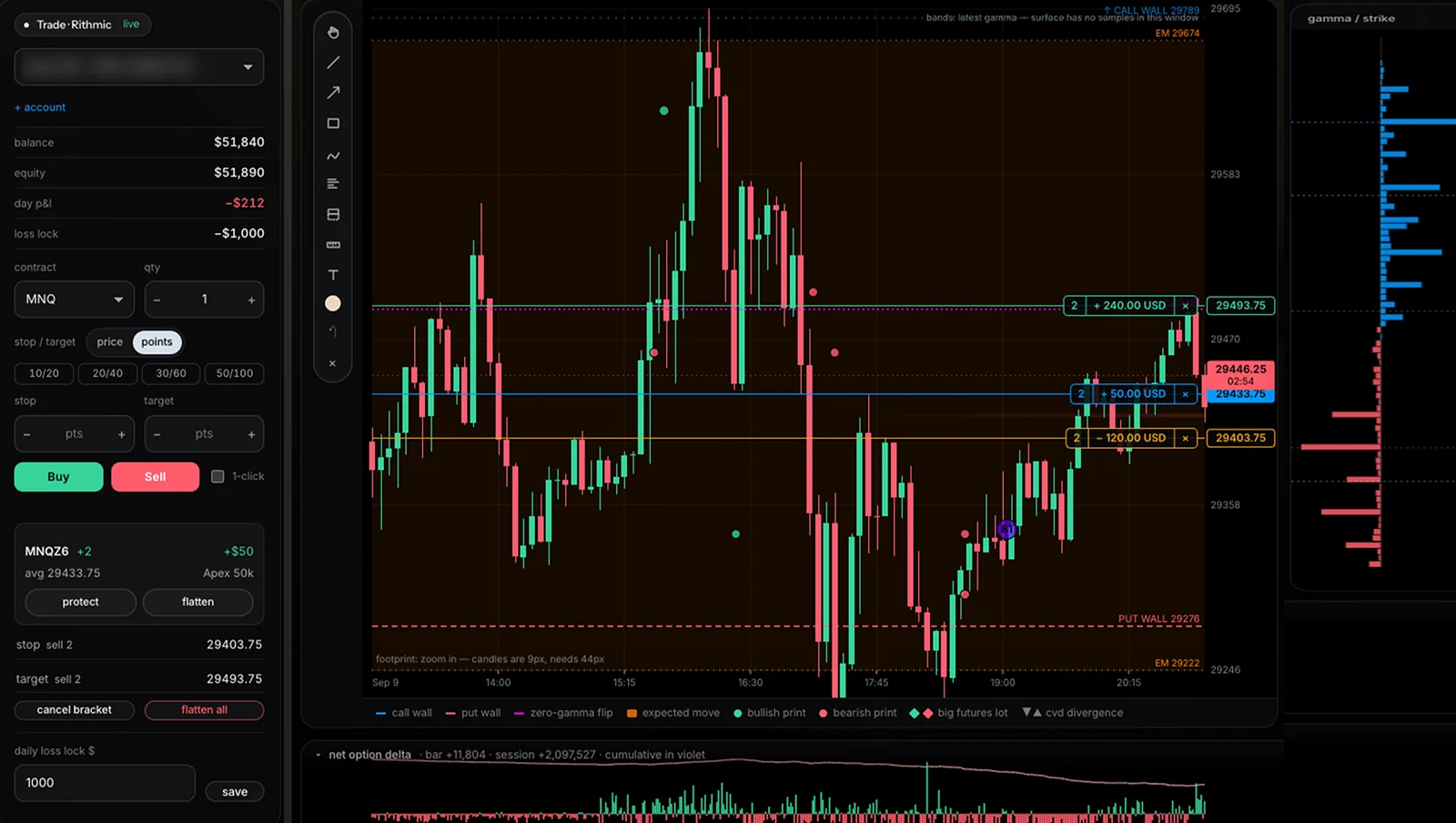
What you see
- Three lines, three prices. The position’s average entry, the resting stop and the resting target, each with a pill showing the contract count and the profit or loss in dollars at that price (in the screenshot: +$240 at the target, −$120 at the stop, +$50 open).
- Drag to move. Drop a line at a new price, confirm, and the protection is re-sent to the broker at that level. Missing a side? Drag the SL or TP handle out of the entry line to add it.
- Cancel one side. Each line has its own ×. Cancelling the stop leaves the target in place, and the other way round.
- Everything else on the same screen. Gamma walls, the expected move and the order-flow markers are drawn on the same price axis, so a stop can be placed with the put wall and the liquidity in view rather than in a separate window.
Where the stop actually lives
The most important property of a stop is invisible on any chart: who holds it. Many platforms keep the stop inside the app and send a market order when price touches it. That works until the app is not running.
| If this happens… | Stop held by the platform | Stop resting at the exchange (the terminal) |
|---|---|---|
| Your internet drops | Not sent until you reconnect | Still working |
| The app or browser crashes | Gone with the app | Still working |
| You close the laptop | Gone | Still working |
| Price gaps through the stop | Market order after the gap is seen | Triggers at the exchange |
| The stop fills | The platform must cancel the target | The exchange cancels the target (OCO) |
The terminal sends stop and target to your broker through Rithmic as a native one-cancels-other pair that rests at the exchange. Nothing in our software has to be running for it to trigger.
What we proved before shipping it
“Rests at the exchange” is easy to claim, so we tested it live, on a real account, deliberately on MNQ at $2 a point so the whole proof cost $28:
- The stop rested and fired on its own. It showed up as a working order at the exchange, and when price reached it, it triggered and closed the position. Our order engine was not involved in the exit.
- The OCO worked natively. When the stop filled, the exchange cancelled the target by itself. No polling, no second order from us.
- An impossible stop was refused, honestly. A sell stop above the market is rejected by the exchange, and the terminal now says so instead of pretending it is placed.
That last point is the one worth knowing about any platform. When you send an order, the broker’s first reply only confirms that the request was received. Whether the exchange accepts the order arrives a moment later, on a separate stream, and a rejection there is easy to miss: a platform that takes the first reply as success can show a stop that does not exist. The terminal waits for the exchange’s verdict before it tells you a position is covered, and if your stop was already run through by the time it arrived, it treats that as a stop that fired rather than a protection that exists.
Guardrails around it
- Daily loss lock. Set a dollar limit in the Trade panel and the terminal refuses new entries for the rest of the day once your realised loss reaches it. The −$1,000 lock is visible in the screenshot above.
- Confirmations, or one-click. Every order and every line move asks first, unless you switch on one-click trading deliberately.
- The broker’s numbers, not ours. Balance, equity, positions and fills are read back from the account. The terminal never assumes a fill happened because it sent an order.
- Every move is on the record. Line drags, stop and target edits and flattening are logged in the trading journal, so you can later see how often you widened a stop and what it cost.
Who it is for
Anyone who trades futures through a Rithmic account, from a retail broker account to a prop-firm evaluation, and wants the chart, the order-flow context and the orders in the same window. If you would rather practise first, the sim account uses the same order chart with a simulated balance settled against live prices.
Methodology: the live proof ran on 31 July 2026 on a Rithmic prop-firm account on MNQ: a stop and target placed through the terminal’s order path, the stop left to trigger with the order engine inactive, the target’s cancellation observed in the exchange order notifications; total cost $28. Rejection handling verified with a deliberately invalid stop (sell stop above the market) and with a stop already breached at submission.
Frequently asked questions
Is the stop loss on the order chart held by the terminal or by the exchange?
By the exchange. The stop and target are sent to your broker as a native OCO (one cancels the other) through Rithmic and rest at the exchange. If your internet drops, your laptop closes or the terminal crashes, the stop is still working. We tested this live on MNQ: the stop triggered and closed the position with our software not involved, and the exchange cancelled the target on its own.
What happens when I drag a stop or target line?
When you drop the line, the terminal asks you to confirm the new price and then re-sends the protection at that level to your broker. The lines are drawn from the orders the broker reports as working, so what you see drawn is what is resting.
Which brokers and prop firms work with the order chart?
Any account that trades through Rithmic, which includes many futures brokers and prop firms such as Apex, Lucid Trading and others on their own Rithmic systems. You link the account in the terminal's Trade panel; positions, fills and balances are read back from the broker.
What happens if I set a stop the exchange cannot accept?
It is refused and the terminal shows the refusal. A sell stop has to be below the market and a buy stop above it; if price has already run through your intended stop, the order can only be rejected. The terminal treats that case as a stop that has already been hit and tells you, rather than reporting a protection that does not exist.
Can I practise with the order chart without a live account?
Yes. The terminal has a sim account with a simulated balance that uses the same order chart, the same stop and target lines and the same journal, settled against live prices.